
Ordering is two payments with a warehouse in between, whatever the step numbers say
The operator has published this flow three separate times, and no two versions agree on how many steps it has. They agree on everything that matters.
Every step name below is quoted from the operator. The grouping, and the observation that the counts disagree, are this site.
The bar
The order screen counts to seven, and puts a payment at either end of the warehouse
This strip sits across the top of the order screen and follows you through the whole process. It is the version you will actually live with, because it is the one that tells you where you currently are.
Read the two payments off it. One sits before the warehouse and one sits after, and everything between them happens while your money is already committed and your goods are not yet moving. That is the single most useful thing the bar tells you, and it tells it without a word of explanation.
Operator reference · dated capture

One road, cut in three different places
The promotional video counts five moves. The order screen counts seven. The written guide in the help centre counts ten. Nobody is wrong: a video is selling the idea, a progress bar is reporting a state, and only the written guide is trying to be complete.
The reason this matters is conversational. When somebody in a group chat says they are stuck on step four, the answer depends entirely on which version they are counting from. Lining the three counts up against each other, as below, makes the ambiguity disappear.
| What actually happens | The video | The order bar | The written guide |
|---|---|---|---|
| Making an account | Counted first | Not counted | Not counted |
| Finding the item | Counted second | Select Products | Select Item |
| Pinning colour, size and quantity | Folded into finding | Confirm Order | Submit Purchase |
| Paying for goods and the domestic leg | First payment | Pay for Products | Pay for Products |
| A buyer placing the order with the seller | Not counted | Not counted | Purchasing agent |
| Checking, weighing and storing | Not counted | Inspection and Warehousing | Inspection and Storage |
| Choosing what goes into the parcel | Select items from warehouse | Submit Parcels | Submit the Package |
| Paying a deposit against the international leg | Second payment | Pay international shipping fee | Pay the deposit |
| Settling the difference once it has been packed | Not counted | Not counted | Confirm International Shipping |
| The parcel leaving the warehouse | Not counted | Not counted | Shipment |
| Delivery | Not counted | Wait For Receipt | Receipt |
Not counted means the version does not give that event a number of its own, not that it does not happen. The full written version is on the operator site.
Naming a country is what splits the journey into two priced halves
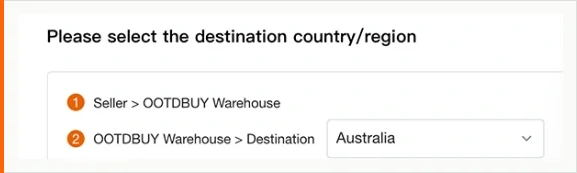
Before anything is paid for, the operator asks for a destination, and it asks in a way that gives the game away. The prompt is numbered. Leg one runs from the seller to the warehouse. Leg two runs from the warehouse to wherever you are.
Only the first of those has a price attached at this point, and it is the seller's price, quoted between two Chinese provinces. The second leg has no number yet because nothing has been weighed. Choosing the country early matters anyway: it decides which carriers are even offered later, and some things cannot be carried at all.
Operator reference · dated capture
What the checkout accepts, and the warning it buries in small type
The payment screen is grouped by method rather than by country, and each group carries its own conditions. The card group lists the schemes it accepts and then adds something worth reading twice: repeated failed attempts will put a temporary hold on your ability to try again.
That turns a fixable problem into a day of waiting. If a card is likely to decline a cross-border charge, the thing to do is clear it with the bank before the third attempt, not after it.
The other group on this screen is regional, and it says so plainly: it is available only to addresses in one country, with a named list of currencies. A method being visible is not the same as a method being open to you.
Operator reference · dated capture
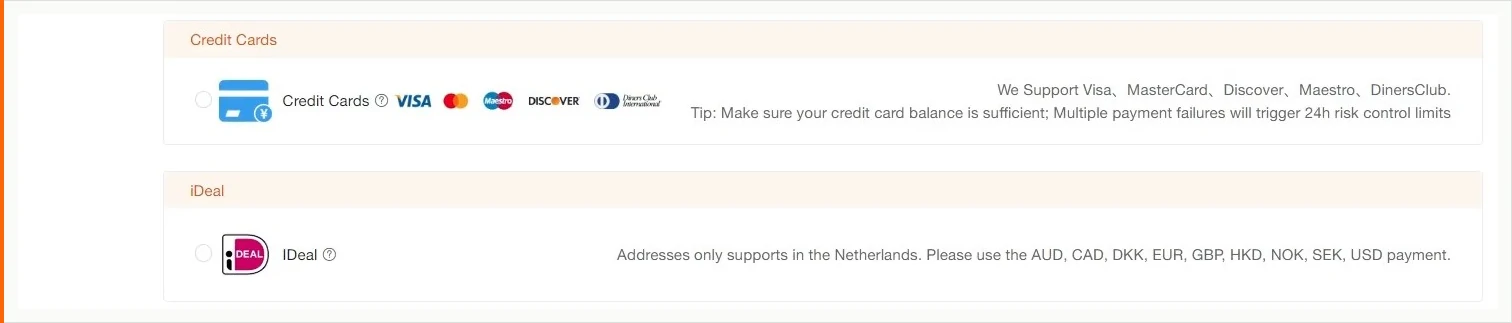
The written guide names a wider set of routes than this screen shows, including bank remittance and a transfer method between friends. Which options appear depends on the account and the destination, so treat any list you read anywhere, including this one, as a starting point rather than an entitlement.
Operator reference · dated capture
The first payment step by step, in the order the screen asks for it
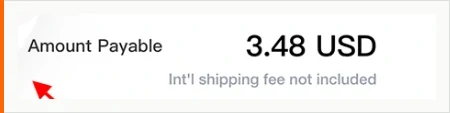
Four things, and one of them is a negative. The line under the total is the most important sentence on the screen, and it is set smaller than every figure above it.
The goods
The seller price for the variant that was pinned, at the quantity set.
The delivery inside China
Getting the item from the seller to the warehouse. The written guide names this in the same sentence as the product price, which is the clearest statement of it anywhere on the operator site.
Anything you switched on
Value-added services are opt-in. Opting in is also how they get paid for.
Not the leg that crosses a border
The screen says so, in smaller type than the total. There is no weight yet, so there is nothing to quote against.
The questions the step counts keep causing
What the link committed you to before any of this started is the previous page. What happens to the goods once they land is the warehouse.
Three versions of the same flow. Which one do I follow?
The written one. It is the only version that treats the purchasing agent, the settlement after packing and the dispatch as events in their own right. The progress bar is a status indicator, not an explanation, and the video is an advertisement that happens to be accurate.
What does the first payment actually cover?
The goods, the delivery inside China that brings them to the warehouse, and any value-added service you switched on. The written guide names the domestic delivery in the same sentence as the product price. The screen names what it excludes in smaller type underneath the total.
Can I keep adding items after I have paid for the first one?
Yes, and that is the ordinary way to use a warehouse. The operator says to repeat the early steps and then carry on, and points out that combining goods is what brings the international cost down. What limits the habit is time, not quantity, and that is on the warehouse page.